Friends > Friends category
Friends category
To use this feature, you may be required to update the system software.
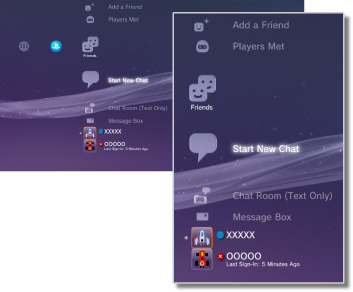
Send or receive messages or do chat with other PS3™ users over PSNSM. You must create (sign up for) a Sony Entertainment Network account to use these features. The following icons are displayed under  (Friends). The icons displayed vary depending on the conditions of use.
 |
Block List | View a list of people on your block list. |
|---|---|---|
 |
Add a Friend | Send a request to add someone to your Friends list. |
 |
Players Met | View a list of people you have played PlayStation®3 format online games* with. Select this icon to send a message to a player or to request to add a Friend. |
 |
Start New Chat | Start a chat. |
 |
Chat Room (Text Only) | This icon is displayed when there is a chat room for text chat. If a new chat room is added,  is displayed. is displayed. |
 |
Voice/Video Chat Room | This icon is displayed during a voice / video chat. |
 |
Message Box | Create new messages and view messages that you have received and sent. |
 |
(your online ID) | The avatar that you select for your account is displayed here. |
|
(Friend's name) | This icon indicates a person on your Friends list. By selecting this icon, you can send and receive messages or do chat with Friends. |
| * |
Some games may not support this feature. |
|---|
Hints
- On the PS3™ system, users who are on your Friends list are called "Friends". Also, e-mails that you send or receive under (Friends) are called "messages".
- A maximum of 2,000 Friends can be added.
- A maximum of 100 Friends are displayed.
- If you have more than 100 Friends, you must sign out and then sign in again to update the Friends who are displayed. When doing this, also sign out of all other devices that you are signed in to PSNSM on.
- You can also manage your Friends from devices such as PS4™ systems, PS Vita systems, and smartphones or other devices with PlayStation®App installed.
- Up to 50 players can be displayed under
 (Players Met). After this limit is reached, the oldest entry will be automatically deleted each time a new player is added.
 - To do voice chat, you will need an audio input / output device (such as a headset, sold separately). To chat with video, you will also need a USB camera (sold separately).
- You can use a compatible USB headset / Bluetooth® headset / EyeToy™ USB camera / PlayStation®Eye / USB camera compliant with USB video class (UVC) on the PS3™ system.
- When connecting a USB camera using a USB hub, use a hub that supports USB 2.0. If a hub that does not support USB 2.0 is used, image degradation may occur or the image may not be displayed.
- For information on supported peripherals and usage instructions, contact the retailer where the peripherals are sold.
