


Top > Party > Party owner and people who can join a party
 Party owner and people who can join a party
To create a party, you must have friends who also use PS Vita systems or PS TV systems.
Owner
The person who creates a party becomes the party owner. The icon  (Owner) appears.
- When the party owner leaves, another person becomes the owner and the party can continue. To leave a party, select
 (Options) > [Leave].
 - The owner can kick out a member of the party. Select the member who you want to kick out and select (Options) > [Kick Out].
People who can join a party
When the owner creates the party, he or she sets which players can join.
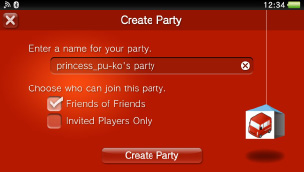
- Friends of Friends
Friends of the party owner can join the party freely. When they join the party, their friends can also join. Select this to expand the group of potential party members and make it easy for them to join. - Invited Players Only
Only players who the owner invites can join the party. A member of the party can suggest other players for the owner to invite.
A maximum of eight people can join a party.