


Up to 25 of the latest email messages on a server are displayed when you select  (Inbox). Received messages are temporarily saved on the memory card. When your Inbox is full, your system automatically deletes the oldest message each time a new message is received.
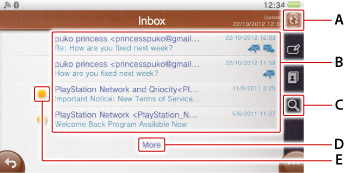
- A )
 (Refresh)
Select to receive new messages.- B )
- Message
Select to open the message. - C )
 (Search)
Select to search for messages in a folder. You can narrow your search by selecting a search category such as [From] and [Subject].- D )
- More
Scrolling down to the bottom of the page and displaying [More] shows the 25 previous messages. - E )
 (New Message Indicator)
This icon appears with new messages.
- If the message size is large, your system may not receive the message. Also when an attached file size is too large, only body text might be received.
- When languages not supported by your system are used in the body of a message, the text may be displayed incorrectly.
Enlarging and reading email messages that are in HTML format
You can enlarge and read email messages that are in HTML format.
When reading the message, double tap the screen to zoom in. The area around the spot you double tap is enlarged. Double tap the screen again to zoom out and return the message to its original size. You can also zoom in by pinching the screen out and zoom out by pinching the screen in.
Displaying and saving attached files
You can view and save files that are compatible with your system.
 (Image file)
Select (Image file) in a message to start  (Photos) and view the image. To save the image, while it is displayed, select
  (Save) at the bottom right.
 (Calendar file)
Select (Calendar file) in a message to view the event. To add an event to a calendar, select  (Options) > [Add to Calendar] and follow the instructions displayed.
Receiving messages automatically
Even when your system is in standby mode or when  (Email) is not running, messages can be received automatically at a set interval. When you receive a new message, a notification message appears on the upper right of the screen. Select (Options) > [Settings] > [Receive Automatically] to select the interval at which messages will be received.
Controlling with the buttons on your system
You can use the buttons on your system with email messages that are in HTML format.
| Scrolling up or down | Move the left stick up or down. |
|---|---|
| Zooming in or zooming out on a web page | Move the right stick up or down. |
| Showing or hiding the cursor | Press the  button. button. |
| Moving a cursor link by link | Press the directional buttons after displaying a cursor by pressing the button. |
| Moving the cursor in the desired direction | Move the left stick up, down, left or right, after show a cursor by pressing the button. |
| Showing or hiding the menu for a link | Press the button to display the cursor, then press the  button while placing the cursor over the link. button while placing the cursor over the link. |
To use this feature, you must select the  (Settings) > [Start] > [System] > [Control with Buttons on PS Vita System] checkbox to set a checkmark to enable the setting.