


To use this feature, you must be signed up for Sony Entertainment Network on your system.
To check for and receive new messages, select  (Refresh) on the screen that lists message exchanges. When new messages arrive,
  (New Message Indicator) appears next to new messages and next to message exchanges that have new messages.
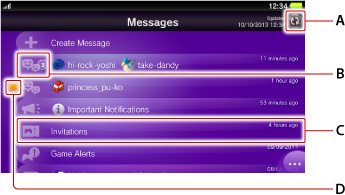
- 1.
- Select the group for the message that you want to view.
- 2.
- Select the message.
The message appears and you can read the full text of the message. - If an invitation to join a game, or an item or other add-on data item from a game is received in a message, select it to play the game. After using the invitation to join the game or the attached data item, the message will no longer be displayed. If you do not own the game for that invitation or add-on data item and the game can be purchased in
 (PS Store), the store page appears.
- A maximum of the latest 200 messages from groups can be received.
- On the screen that lists messages, select
 (Options) > [Settings] > [Receive Automatically] to change the interval for receiving messages. If you set this to [Off], you will only receive messages when you select (Refresh).
 - You cannot receive messages from a player on your block list.
- Select (Options) > [Grief Report] to report inappropriate messages.
- If a user is restricted from using chat features, that user might receive party invitations but cannot join parties. For details, see "Sub Account Management".
- You can receive voice messages on your system but cannot play them.
Viewing and saving attached image
Select  (Attached file) on a message to view an image. When the image is displayed, select
  (Save) in the lower right to save the image.
- Images unsupported by your system and content other than images cannot be displayed or saved.
- You can view the saved images in
 (Photos).
 - You can search for information related to some types of graphic files, such as screenshots from games, in PlayStation®Store by selecting (PS Store).