


Top > PS3 Remote Play > Remote play outside your home via the Internet
 Remote play outside your home via the Internet
You can use the PS3 Remote Play application when you are away from home and even when you are overseas.
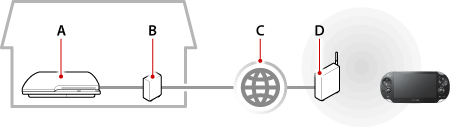
- A )
- A PS3™ system
Connecting to the Internet using a LAN (Ethernet) cable or wireless network - B )
- A cable modem or DSL modem
- C )
- Internet
- D )
- A wireless access point or a wireless router
- You may not be able to use remote play via the Internet in some network environments. For details, see
 (Network) >
  (Remote Play) > [Using remote play (via the Internet)] in the PS3™ system's user's guide.
 - How to use a public Wi-Fi hotspot and how much it costs varies by service provider. Contact the service provider for details.
Preparing for first-time use
Before using remote play via the Internet, do the following:
- Link the PS3™ system and your system to the same Sony Entertainment Network account.
- When using an access point provided by a commercial or public Wi-Fi service, or by a private wireless network, set up your system so that it can connect to that access point.
Registering your system with the PS3™ system
Register your system using the Wi-Fi on your system and the PS3™ system.
If you are using a PS3™ system that does not have Wi-Fi network capability, register your system by connecting your system to the PS3™ system through an access point that is connected to the PS3™ system. Perform this procedure with your system near the PS3™ system or the access point.
- 1.
- On the PS3™ system, select
 (Settings) > [Remote Play Settings] > [Register Device] > [PS Vita System].
A number appears on the screen. - 2.
- On your system, select
 (PS3 Remote Play) > [Start] > [Next].
 - 3.
- Enter the number displayed on the PS3™ system's screen, and then select [Register].
When the devices connect successfully, a message indicating that the registration is complete appears. - 4.
- Select [OK] on the PS3™ system.
Playing remotely
To use remote play via the Internet from outside your home, you must first put the PS3™ system into remote play connection mode:
- Sign up for PlayStation™Network
Use the same Sony Entertainment Network account on your PS Vita system and your PS3™ system. - Select (Network) > (Remote Play) to put the PS3™ system into remote play connection mode.
- 1.
- On your system, select (PS3 Remote Play) > [Start].
When using PS3 Remote Play for the first time, a message informs you that it is necessary to register your system with the PS3™ system. If you see this message, perform the registration. - 2.
- Select [Connect via Internet].
Follow the screens to complete the operation.
When the devices connect successfully, the PS3™ system screen appears on your system.
- If you enable remote start on the PS3™ system, you can use remote play when the PS3™ system is in standby mode. For details, see (Settings) > [Remote Play Settings] > [Remote Start] in the PS3™ system's user's guide.
- During remote play, if you go to the screen for a different application, the remote play connection is closed after 30 seconds.